
Access Denied
IMPORTANT! If you’re a store owner, please make sure you have Customer accounts enabled in your Store Admin, as you have customer based locks set up with EasyLockdown app. Enable Customer Accounts
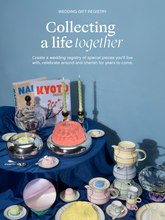
Lista de Presentes
Oferecer presentes tornou-se muito mais luxuoso com a nossa exclusiva Lista de Presentes, onde pode selecionar os seus artigos favoritos da nossa seleção requintada, com marcas icónicas como Gucci, Saint Laurent, BYREDO, Diptyque, Les Ottomans, entre muitas outras.
Basta selecionar as suas peças preferidas de moda, beleza ou decoração, criar uma lista personalizada ao seu gosto e partilhá-la com quem lhe é querido, para uma experiência de oferta perfeita. Quer procure moda de autor ou um toque de luxo para a sua casa, a nossa lista de presentes torna simples partilhar os seus desejos e receber os artigos que realmente adora. Crie a sua lista hoje e comece a curadoria da sua seleção.
COMO CRIAR
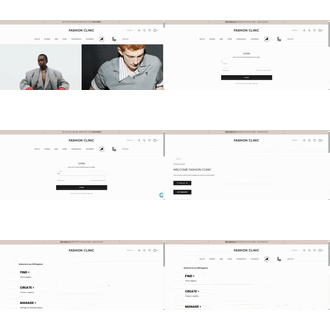
Aceda à sua conta e comece a sua lista
Inicie sessão na sua conta Fashion Clinic e aceda ao seu painel pessoal para começar. A partir daí, navegue até à Lista de Presentes e clique em Criar Lista para começar a curar a sua seleção.
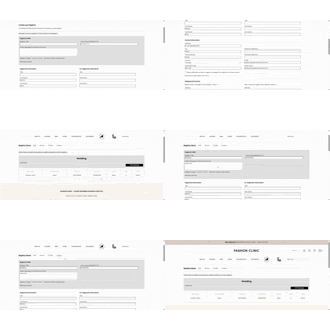
Complete os dados da sua lista
Preencha as informações da sua lista, incluindo o nome da lista, o tipo de evento e a data do evento. Depois de concluído, guarde a sua lista para a ativar.
A partir daí, pode consultar a sua lista, editar os detalhes, gerir a sua seleção, partilhar o seu link exclusivo e acompanhar os pedidos feitos através da sua lista.
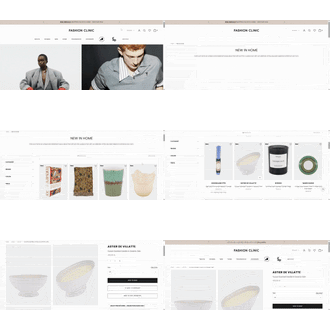
Curadoria dos seus favoritos
Explore as coleções requintadas de moda de autor, beleza e decoração da Fashion Clinic e adicione as peças que mais admira. Em cada página de produto, clique em Adicionar à Lista para a incluir na sua seleção.
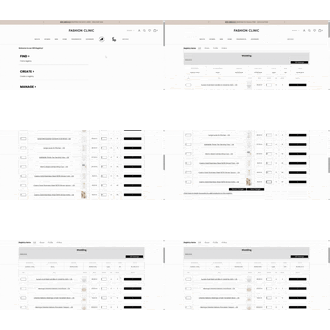
Reveja e ajuste a sua seleção
Volte à sua lista sempre que quiser para ajustar quantidades ou remover artigos, garantindo que esta se mantém perfeitamente alinhada com os seus desejos.
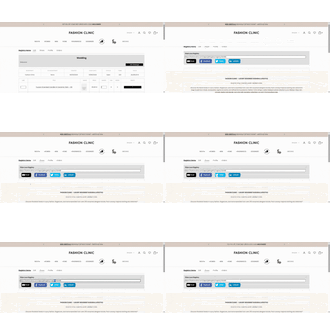
Partilhe com Família e Amigos
Partilhe o link exclusivo da sua lista com familiares e amigos, para uma experiência de oferta perfeita e requintada.
Acompanhe e receba
Acompanhe os artigos adquiridos diretamente a partir do seu painel e desfrute de receber as peças escolhidas especialmente para si.
Ainda tem dúvidas?
Contacte-nos
(chamada para rede móvel nacional)
De segunda a sexta-feira, das 10h às 19h, hora de Lisboa.
Invalid password
Enter
Fashion Clinic – Moda de Luxo & Lifestyle de Luxo
Estilo Eclético. Curadoria de Luxo. Vida Inspirada.
Descubra as últimas tendências em moda de luxo, perfumes de luxo e essenciais para a casa, de mais de 200 prestigiadas marcas de designers internacionais. Desde peças de desfiles internacionais e malas de destaque, a sapatos premium, acessórios sofisticados, fragrâncias icónicas e objetos de design para casa, a Fashion Clinic reúne uma seleção de luxo cuidadosamente escolhida para elevar o seu estilo de vida. Explore novidades todas as semanas e descubra coleções exclusivas que não encontrará em mais nenhum lugar.

O Seu Destino de Moda de Luxo
Seleção exclusiva de mais de 200 marcas internacionais de luxo

Devoluções Simplificadas
Devoluções até 30 dias

Entrega em Todo o Mundo
Envios para mais de 30 países